Audio
Play music, ambience, voice lines, and sound effects from the dialogue graph. Typewriter sounds give each character a distinct voice during text reveal. Supports Unity's built-in audio and FMOD.
Audio Channels
All audio in DialogueCraft is routed through four channels:
| Channel | Enum | Behavior |
|---|---|---|
| SFX | AudioChannel.SFX | Fire-and-forget one-shots |
| Music | AudioChannel.Music | Loops by default, supports fade in/out |
| Voice | AudioChannel.Voice | One voice at a time, stops previous |
| Ambient | AudioChannel.Ambient | Loops by default, supports fade in/out |
Audio Node
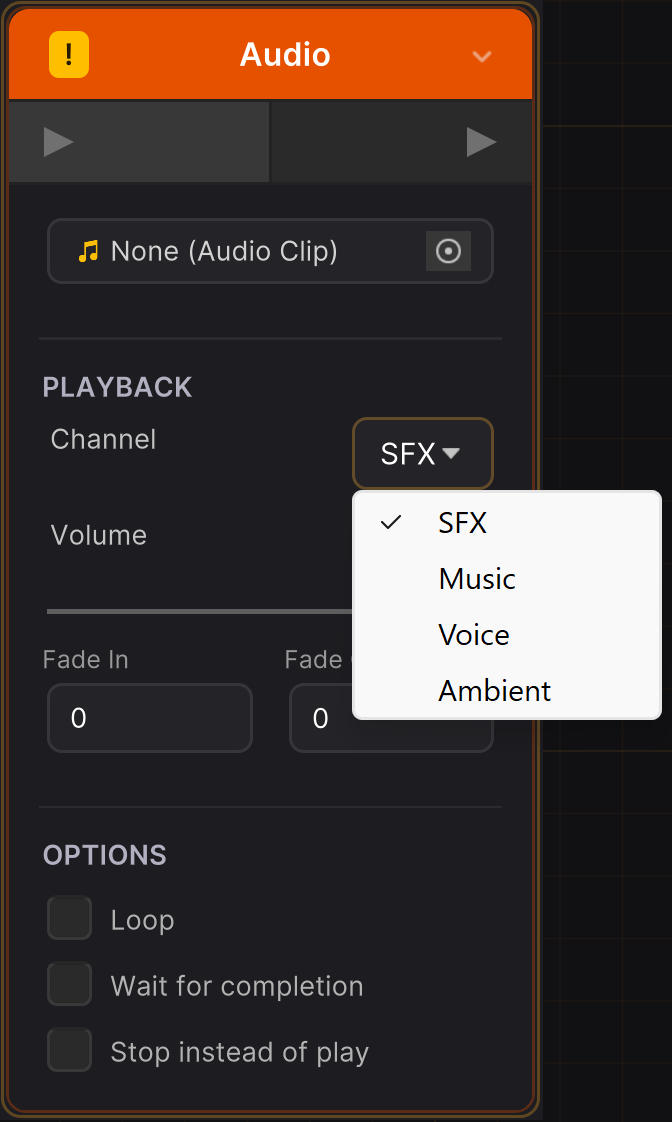
The Audio node plays clips from the dialogue graph. Add one via right-click in the editor.
Audio Node Fields
| Field | Type | Description |
|---|---|---|
channel | AudioChannel | Which channel to play on |
audioClip | AudioClip | Unity audio clip (Unity backend) |
fmodEventPath | string | FMOD event path (FMOD backend) |
fmodParameterName | string | Optional FMOD parameter to set |
fmodParameterValue | float | Value for the FMOD parameter |
volume | float | Playback volume (0-1) |
loop | bool | Loop the audio |
fadeInDuration | float | Fade in seconds (0 = instant) |
fadeOutDuration | float | Fade out on stop, seconds |
waitForCompletion | bool | Pause graph until audio finishes |
stopInstead | bool | Stop the channel instead of playing |
eventOnly | bool | Fire events only, skip playback |
Event-Only Mode
When eventOnly is true, the Audio node fires a DialogueRunner.OnDialogueEvent with event names like Audio_Play_Music or Audio_Stop_Voice, but does not play audio. Use this to handle audio externally through your own system.
Voice Lines on Text Nodes
Each Text node can have an attached voice clip. The DialogueRunner plays it automatically when the node is processed.
Unity Voice
Assign an AudioClip to the Text node's audioClip field. The runner plays it through the Voice channel.
FMOD Voice
Set the voiceFmodEventPath field on the Text node. When the global audio source is FMOD, this path is used instead of the AudioClip.
Wait for Voice
Enable waitForVoice on a Text node to hold the dialogue at DialogueState.WaitingForVoice until the voice clip finishes. The runner polls IsPlaying(AudioChannel.Voice) for FMOD events or uses clip duration for Unity audio. The player can skip with Continue().
Voice Events
The DialogueRunner fires events for lip sync integration:
runner.OnVoiceStart.AddListener((VoiceEventArgs args) =>
{
    // args.characterId, args.character, args.clip or args.fmodEventPath
    StartLipSync(args);
});

runner.OnVoiceEnd.AddListener((VoiceEventArgs args) =>
{
    StopLipSync();
});
Typewriter Sounds
Typewriter sounds play as each character is revealed during the typewriter effect, giving NPCs distinct vocal signatures.
TypewriterSound Component
Drop the TypewriterSound component on any GameObject with an AudioSource. It listens to a DialogueRunner and plays sounds as text is revealed.
[AddComponentMenu("CraftWorks/DialogueCraft/Typewriter Sound")]
[RequireComponent(typeof(AudioSource))]
| Field | Default | Description |
|---|---|---|
dialogueRunner | auto-find | Which runner to listen to |
lettersOnly | true | Skip sounds for spaces and punctuation |
maxCharsPerSound | 3 | Suppress sounds when many chars appear at once (skip) |
The component resets its character tracking on each new line and speaker change.
Typewriter Modes
Four modes control how sounds are selected, configured per character or as project defaults:
| Mode | Enum | Description |
|---|---|---|
| Single | TypewriterMode.Single | One clip with pitch variation |
| Random | TypewriterMode.Random | Pick randomly from a pool |
| VowelConsonant | TypewriterMode.VowelConsonant | Different arrays for vowels vs consonants |
| PerLetter | TypewriterMode.PerLetter | Unique clip per letter a-z (Animal Crossing style) |
Sound Resolution Fallback Chain
TypewriterSoundHelper resolves which sound to play using a three-level fallback:
- Character settings -- The speaking character's
CharacterDatatypewriter fields - Project defaults --
DialogueCraftSettingsdefault typewriter fields - UI fallback -- Optional
AudioClippassed by the UI template
Each level checks for sound availability based on the active mode and audio backend.
Per-Character Setup
On a CharacterData asset, configure:
| Field | Description |
|---|---|
typewriterMode | Which mode to use |
typewriterSound | Single mode clip |
typewriterSounds | Random mode clip array |
vowelSounds | VowelConsonant mode vowel clips |
consonantSounds | VowelConsonant mode consonant clips |
letterSounds | PerLetter mode a-z clip array (26 slots) |
typewriterPitch | Base pitch multiplier (default: 1.0) |
typewriterPitchVariation | Random pitch range (e.g., 0.1 for +/-10%) |
typewriterVolume | Playback volume (0-1) |
FMOD equivalents: typewriterFmodEventPath, typewriterFmodEventPaths, typewriterFmodVowelPaths, typewriterFmodConsonantPaths, typewriterFmodLetterPaths.
Project Default Setup
In DialogueCraft Settings, the same fields exist prefixed with default:
defaultTypewriterMode, defaultTypewriterSound, defaultTypewriterSounds, defaultVowelSounds, defaultConsonantSounds, defaultLetterSounds, defaultTypewriterPitch, defaultTypewriterPitchVariation, defaultTypewriterVolume.
TypewriterSoundHelper API
For custom implementations that bypass the TypewriterSound component:
// Full resolution chain (character -> project -> UI fallback)
TypewriterSoundHelper.PlayTypewriterSound(
    characterData, audioSource, currentChar, uiFallbackClip);

// Project defaults only
TypewriterSoundHelper.PlayDefaultTypewriterSound(audioSource, currentChar);

// Direct playback with explicit settings
TypewriterSoundHelper.PlayTypewriterSound(
    audioSource, clip, volume: 0.8f, pitch: 1.2f, pitchVariation: 0.05f);
Unity Audio Backend
The default backend. No setup required -- it works out of the box.
DialogueAudioManager
DialogueAudioManager is a singleton MonoBehaviour that auto-creates on first use (DontDestroyOnLoad). It manages four AudioSource children, one per channel.
var mgr = DialogueAudioManager.Instance;

// Music (loops by default)
mgr.PlayMusic(clip, volume: 0.8f, loop: true, fadeInDuration: 2f);
mgr.StopMusic(fadeOutDuration: 1f);

// Ambience (loops by default)
mgr.PlayAmbience(clip, volume: 0.5f, fadeInDuration: 3f);
mgr.StopAmbience(fadeOutDuration: 2f);

// Voice (one at a time)
mgr.PlayVoice(clip, volume: 1f);
mgr.StopVoice();
bool playing = mgr.IsVoicePlaying;
float remaining = mgr.VoiceRemainingTime;

// SFX (fire-and-forget)
mgr.PlaySFX(clip, volume: 1f);
mgr.PlaySFXAtPoint(clip, worldPosition, volume: 1f);

// Global controls
mgr.PauseAll();
mgr.ResumeAll();
mgr.StopAll();

// Channel access
AudioSource source = mgr.GetChannelSource(AudioChannel.Music);
bool isPlaying = mgr.IsPlaying(AudioChannel.Voice);
Fades use Time.unscaledDeltaTime, so they work correctly when Time.timeScale is 0.
FMOD Integration
Requirements
- FMOD for Unity package (
com.fmod.studio2.02+) - Auto-detected via asmdef
versionDefines. DefinesDIALOGUECRAFT_FMODwhen available.
Setup
Add the FMODAudioSetup component to any GameObject in your scene:
[AddComponentMenu("CraftWorks/DialogueCraft/FMOD Audio Setup")]
On Awake(), it registers FMODAudioProvider with AudioProviderManager. That is the only setup step.
Alternatively, register via code:
AudioProviderManager.SetProvider(new FMODAudioProvider());
Also set the global audio backend in DialogueCraft Settings (audioSource = AudioSourceType.FMOD) so that node inspectors show FMOD event path fields.
Mixed Mode
FMODAudioProvider supports mixed audio -- FMOD events and Unity AudioClips in the same dialogue. Requests with sourceType == AudioSourceType.Unity are delegated to an internal UnityAudioProvider. This means you can use FMOD for music and voice while keeping Unity AudioClips for simple SFX.
FMOD Channel Management
The provider manages one FMOD.Studio.EventInstance per persistent channel (Music, Ambient, Voice). SFX events are fire-and-forget -- they call instance.release() immediately after instance.start().
Stop behavior respects fade: fadeOut > 0 uses STOP_MODE.ALLOWFADEOUT, otherwise STOP_MODE.IMMEDIATE.
FMOD Parameters
Audio nodes can set an FMOD parameter on playback:
fmodParameterName: "intensity"
fmodParameterValue: 0.8
This calls instance.setParameterByName() before starting the event.
Custom Audio Provider
Implement IDialogueAudioProvider to integrate any audio middleware:
public class WwiseAudioProvider : IDialogueAudioProvider
{
    public string ProviderName => "Wwise";

    public void Play(AudioPlaybackRequest request)
    {
        // Route request.channel to your audio system
    }

    public void Stop(AudioChannel channel, float fadeOut)
    {
        // Stop audio on this channel
    }

    public bool IsPlaying(AudioChannel channel)
    {
        // Return true if channel is active (used for wait-for-completion)
    }

    public void PlayOneShot(AudioOneShotRequest request)
    {
        // Fire-and-forget sound (typewriter clicks, bark audio)
    }

    public void PauseAll() { /* Pause active audio */ }
    public void ResumeAll() { /* Resume paused audio */ }
    public void StopAll() { /* Stop everything */ }
}

// Register at startup
AudioProviderManager.SetProvider(new WwiseAudioProvider());
AudioPlaybackRequest
The unified request struct for channel-based playback:
public struct AudioPlaybackRequest
{
    public AudioSourceType sourceType;     // Unity or FMOD
    public AudioChannel channel;           // SFX, Music, Voice, Ambient
    public AudioClip clip;                 // Unity clip
    public string fmodEventPath;           // FMOD event path
    public string fmodParameterName;       // Optional FMOD parameter
    public float fmodParameterValue;
    public float volume;                   // 0-1
    public bool loop;
    public float fadeInDuration;           // Seconds
    public float fadeOutDuration;          // Seconds
}
AudioOneShotRequest
For fire-and-forget sounds (typewriter, barks):
public struct AudioOneShotRequest
{
    public AudioSourceType sourceType;
    public AudioClip clip;
    public string fmodEventPath;
    public float volume;
    public float pitch;                    // 1.0 = normal
    public float pitchVariation;           // Random range (+/-)
}
AudioProviderManager
Static manager for the active audio provider:
// Access (auto-initializes to UnityAudioProvider)
IDialogueAudioProvider provider = AudioProviderManager.Provider;

// Switch provider
AudioProviderManager.SetProvider(new FMODAudioProvider());

// Reset to Unity default
AudioProviderManager.ResetToDefault();
The manager never returns null -- on first access, it creates a UnityAudioProvider.