Settings Reference
This page documents all configurable settings in DialogueCraft, covering the DialogueCraftSettings ScriptableObject, its public API, and the editor preferences stored via EditorPrefs.
DialogueCraftSettings
DialogueCraftSettings is a ScriptableObject singleton located at Assets/Resources/DialogueCraftSettings.asset. It is loaded automatically via Resources.Load at runtime and in the editor. If the asset does not exist, the editor creates one automatically on first access.
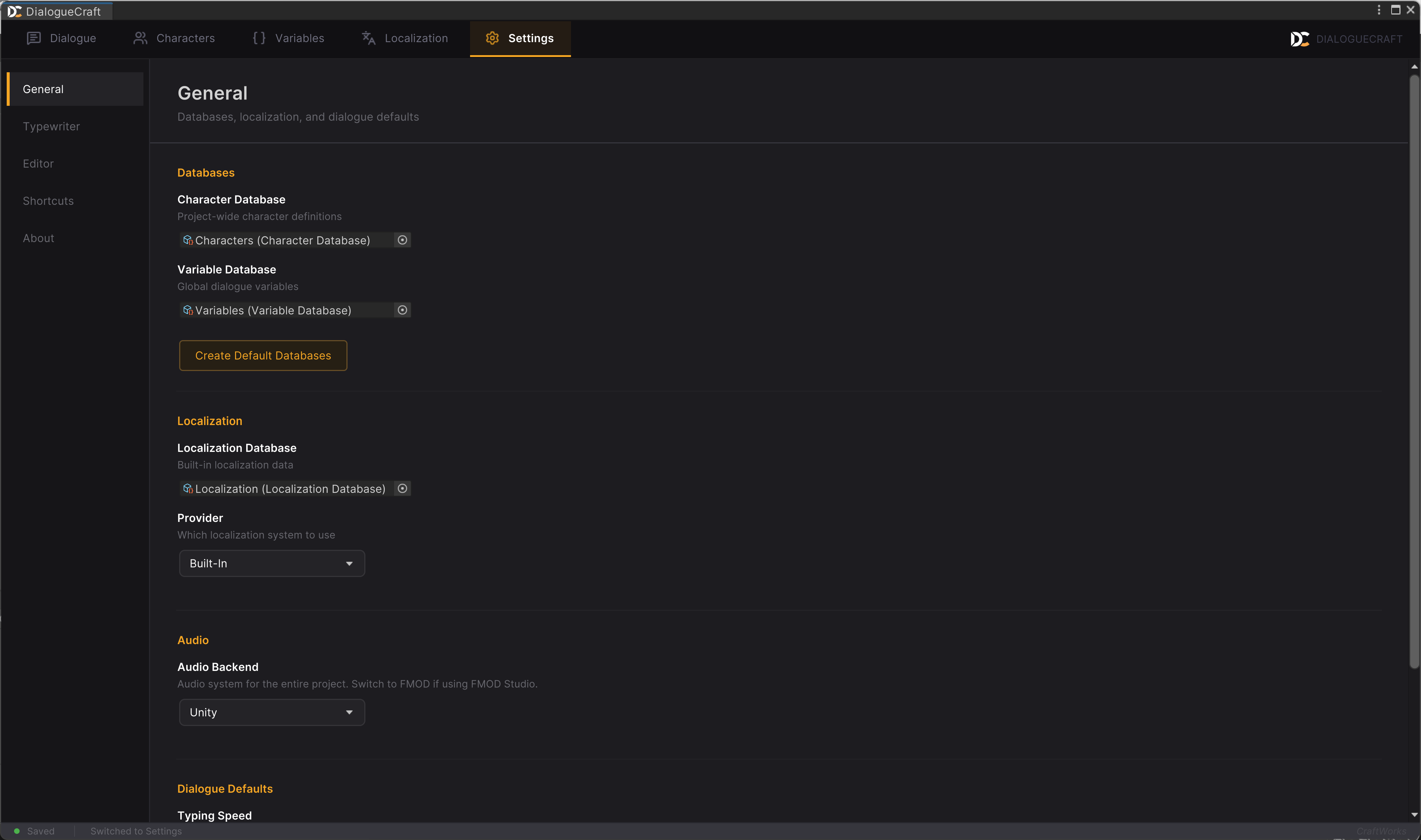
Class: DialogueCraft.DialogueCraftSettings
Source: Runtime/Data/DialogueCraftSettings.cs
Database References
These fields link the project-wide databases that DialogueCraft uses for characters, variables, and localization.
| Field | Type | Default | Description |
|---|---|---|---|
characterDatabase | CharacterDatabase | null | The character database for this project. All dialogues reference characters from this asset. |
variableDatabase | VariableDatabase | null | The variable database for this project. Stores global variable definitions used in conditions and state tracking. |
localizationDatabase | LocalizationDatabase | null | The localization database for this project. Contains all translatable text entries. |
Localization Settings
| Field | Type | Default | Description |
|---|---|---|---|
localizationProvider | LocalizationProviderType | BuiltIn | Which localization backend to use. See values below. |
LocalizationProviderType values:
| Value | Description |
|---|---|
BuiltIn (0) | DialogueCraft's own localization system with CSV import/export. Works standalone with no additional packages. |
LocalizeCraft (1) | LocalizeCraft integration. Provides AI-powered translation and a shared database with a dedicated UI. Requires the LocalizeCraft package. |
UnityLocalization (2) | Unity's official localization package (com.unity.localization). Delegates to Unity's localization tables. |
Audio Settings
| Field | Type | Default | Description |
|---|---|---|---|
audioSource | AudioSourceType | Unity | The audio backend for the entire project. Applies globally to voice lines, sound effects, and typewriter sounds. |
AudioSourceType values:
| Value | Description |
|---|---|
Unity | Use AudioClip assets and Unity's built-in audio system. |
FMOD | Use FMOD Studio event paths for playback. Requires com.fmod.studio 2.02 or later. FMOD support is auto-detected via asmdef version defines (DIALOGUECRAFT_FMOD). |
Dialogue Defaults
| Field | Type | Default | Range | Description |
|---|---|---|---|---|
defaultTypingSpeed | float | 0.05 | 0.01 -- 0.2 | Default typing speed in seconds per character for the typewriter effect. |
autoSave | bool | true | -- | Whether to auto-save dialogue assets when they are modified in the editor. |
Default Typewriter Sound (Unity Audio)
These fields define the project-wide default typewriter sound configuration when using Unity's audio backend. Individual characters can override these values on their CharacterData asset.
| Field | Type | Default | Range | Description |
|---|---|---|---|---|
defaultTypewriterMode | TypewriterMode | Single | -- | How typewriter sounds are selected. See values below. |
defaultTypewriterSound | AudioClip | null | -- | The sound clip used in Single mode. |
defaultTypewriterSounds | AudioClip[] | null | -- | Pool of sound clips for Random mode. One is picked randomly per character typed. |
defaultVowelSounds | AudioClip[] | null | -- | Sound clips for vowels (a, e, i, o, u) in VowelConsonant mode. |
defaultConsonantSounds | AudioClip[] | null | -- | Sound clips for consonants in VowelConsonant mode. |
defaultLetterSounds | AudioClip[26] | new[26] | -- | Per-letter sound mapping for PerLetter mode. Index 0 = a, 1 = b, through 25 = z. |
defaultTypewriterPitch | float | 1.0 | 0.5 -- 2.0 | Base pitch for typewriter sound playback. 1.0 is normal pitch. |
defaultTypewriterPitchVariation | float | 0.05 | 0.0 -- 0.3 | Random pitch variation range applied on each character typed. |
defaultTypewriterVolume | float | 1.0 | 0.0 -- 1.0 | Volume for typewriter sound playback. |
TypewriterMode values:
| Value | Description |
|---|---|
Single | One sound clip with pitch variation applied per character. |
Random | Picks randomly from a pool of sound clips. Useful for keyboard click effects. |
VowelConsonant | Uses different sound pools for vowels versus consonants. |
PerLetter | A unique sound per letter a through z. Produces an Animal Crossing-style voice effect. |
Default Typewriter Sound (FMOD)
These fields mirror the Unity audio typewriter settings but use FMOD event paths instead of AudioClip references. They are only relevant when audioSource is set to FMOD.
| Field | Type | Default | Description |
|---|---|---|---|
defaultTypewriterFmodEventPath | string | "" | FMOD event path for Single mode. |
defaultTypewriterFmodEventPaths | string[] | null | FMOD event paths for Random mode. |
defaultTypewriterFmodVowelPaths | string[] | null | FMOD event paths for vowel sounds in VowelConsonant mode. |
defaultTypewriterFmodConsonantPaths | string[] | null | FMOD event paths for consonant sounds in VowelConsonant mode. |
defaultTypewriterFmodLetterPaths | string[26] | new[26] | FMOD event paths per letter a through z for PerLetter mode. |
Editor Preferences (on the ScriptableObject)
| Field | Type | Default | Description |
|---|---|---|---|
showInspector | bool | true | Whether the inspector panel is visible in the dialogue editor by default. |
Accessing Settings from Code
Singleton Access
The settings instance is accessed through the static Instance property. It loads the asset from Resources/DialogueCraftSettings on first access and caches the result. In the editor, if no asset exists, one is created automatically at Assets/Resources/DialogueCraftSettings.asset.
DialogueCraftSettings settings = DialogueCraftSettings.Instance;

float speed = settings.defaultTypingSpeed;
AudioSourceType backend = settings.audioSource;
Static Convenience Properties
Three static properties provide shorthand access to the database references. Each returns null if the settings asset or the referenced database is not assigned.
| Property | Return Type | Description |
|---|---|---|
DialogueCraftSettings.Characters | CharacterDatabase | Shorthand for Instance.characterDatabase. |
DialogueCraftSettings.Variables | VariableDatabase | Shorthand for Instance.variableDatabase. |
DialogueCraftSettings.Localization | LocalizationDatabase | Shorthand for Instance.localizationDatabase. |
CharacterDatabase chars = DialogueCraftSettings.Characters;
VariableDatabase vars = DialogueCraftSettings.Variables;
LocalizationDatabase loc = DialogueCraftSettings.Localization;
Creating Default Databases (Editor Only)
The CreateDefaultDatabases() method is available in the editor (#if UNITY_EDITOR). It checks each database reference on the settings asset and, for any that are null, creates a new default asset under Assets/DialogueCraft/ and assigns it. This method is useful for first-time project setup.
#if UNITY_EDITOR
DialogueCraftSettings.Instance.CreateDefaultDatabases();
#endif
The method creates the following assets when their corresponding field is null:
Assets/DialogueCraft/Characters.asset(assigned tocharacterDatabase)Assets/DialogueCraft/Variables.asset(assigned tovariableDatabase)Assets/DialogueCraft/Localization.asset(assigned tolocalizationDatabase)
Editor Preferences (EditorPrefs)
The dialogue editor window persists layout and UI state using Unity's EditorPrefs. These values are stored per-machine and are not committed to version control.
Panel Visibility
| Key | Type | Default | Description |
|---|---|---|---|
DialogueCraft_ShowInspector | bool | true | Whether the node inspector panel is visible in the Dialogue tab. |
DialogueCraft_ShowPreview | bool | false | Whether the dialogue preview panel is visible. |
DialogueCraft_ShowValidation | bool | false | Whether the validation panel is visible. |
Panel Sizing
| Key | Type | Default | Description |
|---|---|---|---|
DialogueCraft_InspectorWidth | float | 300 | Width in pixels of the inspector side panel. |
DialogueCraft_PreviewWidth | float | 350 | Width in pixels of the preview side panel. |
Navigation State
| Key | Type | Default | Description |
|---|---|---|---|
DialogueCraft_ActiveTab | int | 0 | Index of the last active tab. Maps to: 0 = Dialogue, 1 = Characters, 2 = Variables, 3 = Localization, 4 = Settings. |
DialogueCraft_LastDialogue | string | "" | Asset path of the last opened dialogue. The editor re-opens this dialogue automatically on launch. |
DialogueCraft_LastCreateFolder | string | "" | The last folder path used when creating a new dialogue asset via the save dialog. |
Filter State
| Key | Type | Default | Description |
|---|---|---|---|
DialogueCraft.Variables.TypeFilters | string | "" | Comma-separated list of active type filters in the Variables tab (e.g., "Int,Bool"). An empty string means no filters are active and all types are shown. |